Apple's image format explained — what it is, why it exists, and how to open HEIC files on any device
The short answer
A HEIC file is a photo stored in Apple's High Efficiency Image Container format. Every iPhone since iOS 11 (2017) saves photos as HEIC by default. The format uses HEVC compression — the same codec behind 4K video — to store images at roughly half the size of a JPEG with no visible quality loss.
The trade-off is compatibility. Windows, Android, most web browsers, and many image editors don't open HEIC files natively. If you've ever received an iPhone photo you couldn't view, the HEIC format is the reason.
What does HEIC stand for?
HEIC stands for High Efficiency Image Container. Each word describes a specific part of the format.
High Efficiency refers to the compression method. HEIC uses HEVC (H.265), a codec originally designed for video streaming. Applied to still images, HEVC compresses a 12-megapixel iPhone photo to roughly 2 MB — the same photo as JPEG takes about 4 MB.
Image Container means a HEIC file holds more than a single image. The .heic file type is a wrapper that packages multiple data layers into one file:
- Primary image — the photo itself, encoded in 10-bit color with Display P3 wide gamut
- Thumbnail — a smaller preview for fast rendering in file browsers
- EXIF and GPS metadata — camera model, lens settings, date, and location
- Depth map — 3D depth data from dual-lens or LiDAR cameras
- Live Photo frames — the 1.5-second video clip attached to the still
- Burst sequences — multiple shots from a burst stored in a single .heic container
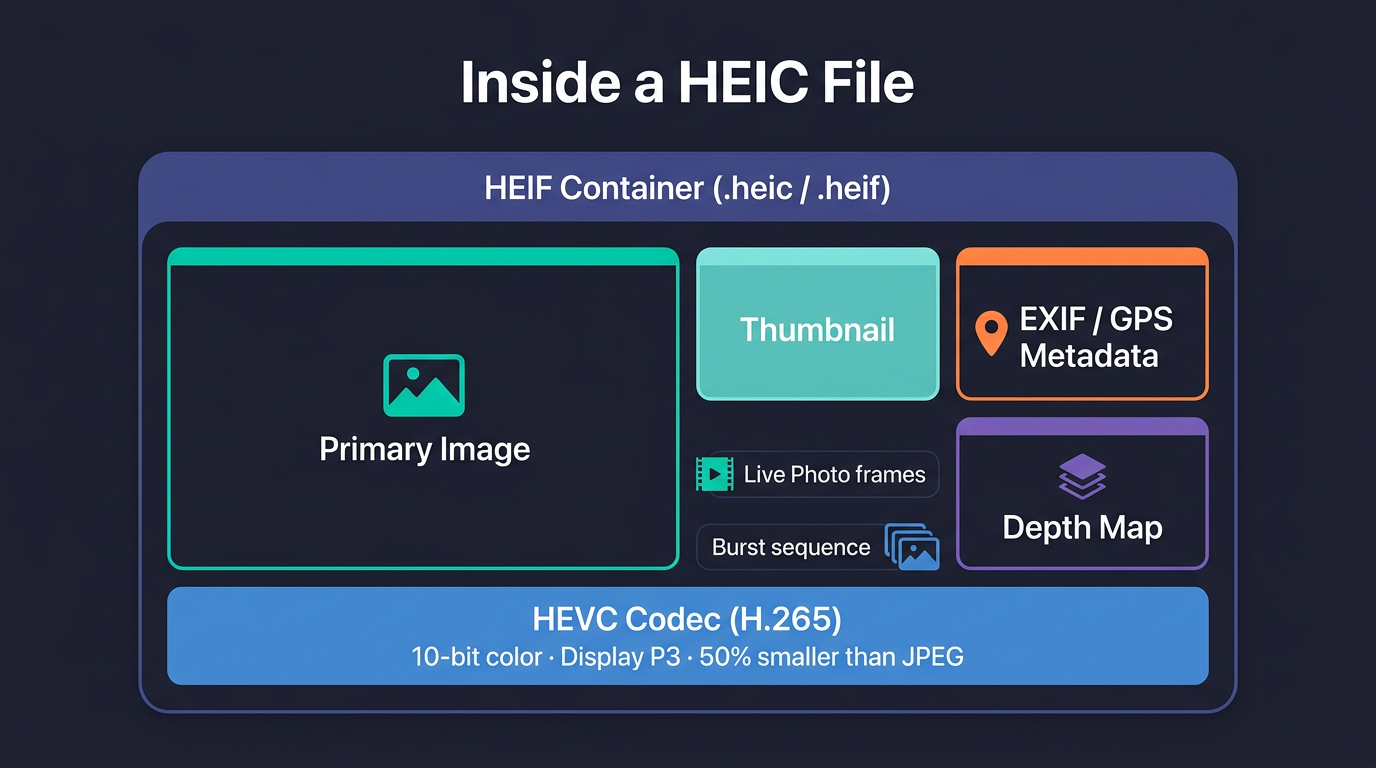
The .heic and .heif file extensions are both valid. In practice, iPhone photos use .heic almost exclusively.
How the HEIC format works
The HEIC format has two layers: a container and a codec.
The container is HEIF (High Efficiency Image File Format), an ISO standard (ISO/IEC 23008-12). HEIF defines how images, thumbnails, and metadata are packaged together. Think of it like MP4 for video — a box that holds different types of data in a structured way.
The codec is HEVC (H.265). This handles the actual image compression. HEVC analyzes image blocks and predicts pixel values from neighboring regions, then stores only the differences. The result is aggressive compression with minimal visual degradation.
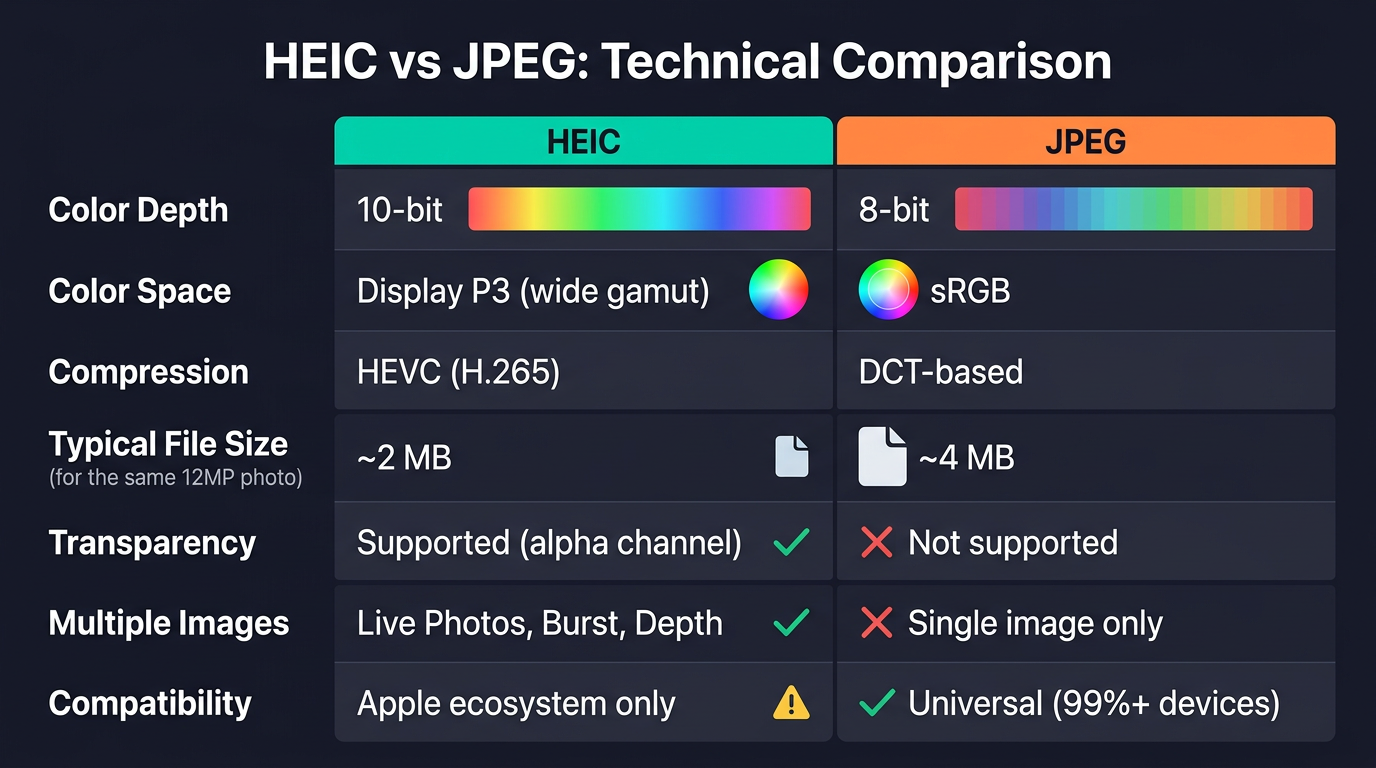
Compared to JPEG, the HEIC image format stores more data in less space:
| Property | HEIC | JPEG |
|---|---|---|
| Color depth | 10-bit (1,024 shades per channel) | 8-bit (256 shades per channel) |
| Color space | Display P3 (wide gamut) | sRGB |
| Transparency | Supported | Not supported |
| Multiple images | Live Photos, burst, depth | Single image only |
| Typical file size (12MP) | ~2 MB | ~4 MB |
| Compatibility | Apple ecosystem | Universal |
HEICcon's converter decodes HEIC files using libheif v1.21.2 compiled to WebAssembly — the same decoding engine that powers GIMP and ImageMagick.
HEIF vs HEIC: what's the difference?
HEIF is the container specification. HEIC is one implementation of that container.
HEIF (High Efficiency Image File Format) defines how images are packaged — it's a blueprint, not a codec. Different codecs can sit inside a HEIF container, and the file extension changes based on which codec is used.
HEIC is HEIF with HEVC compression. This is Apple's implementation — what iPhones produce. Another implementation is AVIF, which is HEIF with the AV1 codec. Same container format, different compression engine.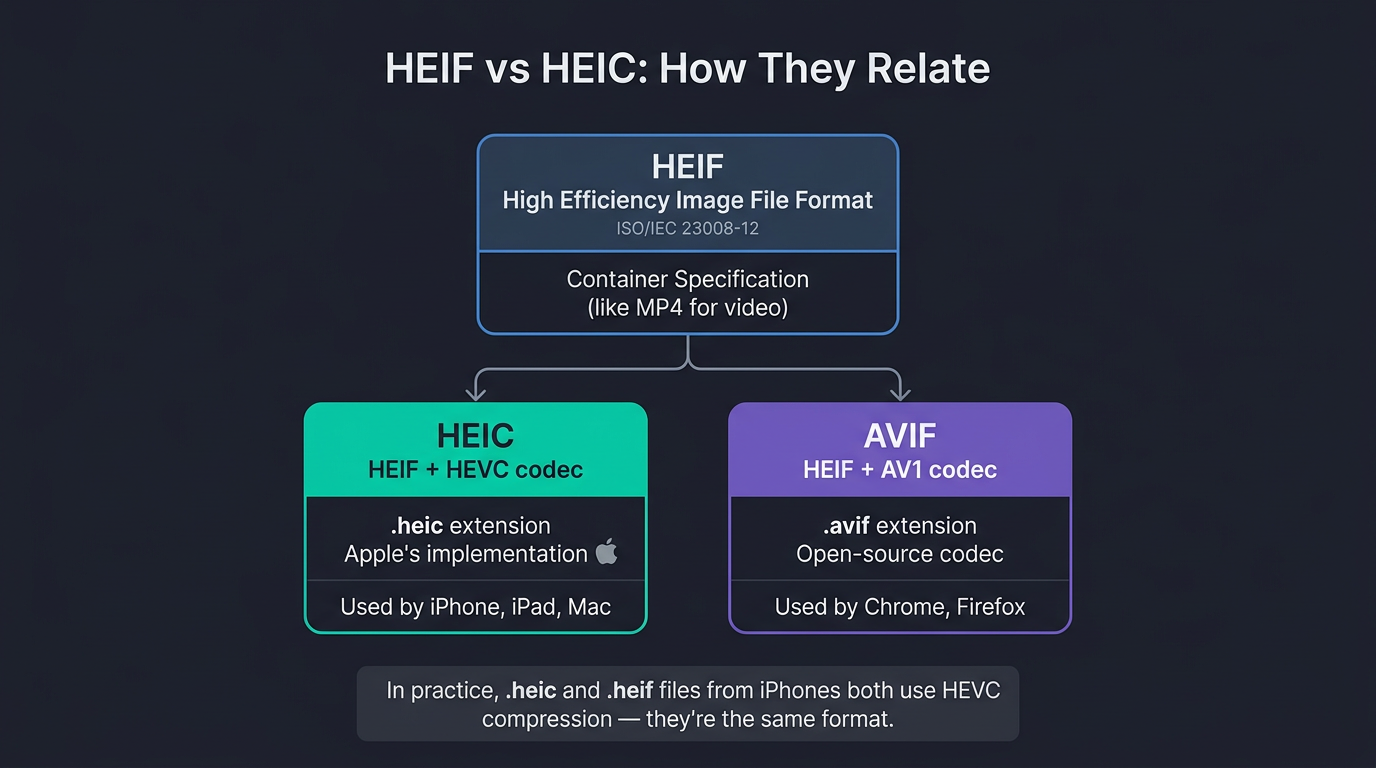
In practice, .heic and .heif files from iPhones are the same thing — both use HEVC compression. HEICcon's decoder handles both file extensions identically.
Why does my iPhone save photos as HEIC?
Apple switched to HEIC in iOS 11 (September 2017) for three reasons:
- Storage savings. A 12MP HEIC photo is roughly 50% smaller than the same shot as JPEG. For a 256 GB iPhone, that translates to thousands of additional photos before running out of space.
- Richer data per file. HEIC stores Live Photos (still + 1.5-second video), burst sequences, and depth maps in a single container. JPEG would need separate files for each.
- Better color. iPhone cameras capture in 10-bit color with Display P3 gamut. HEIC preserves this data. JPEG is limited to 8-bit sRGB — a narrower range that clips vivid reds, greens, and blues.
The trade-off is compatibility outside Apple's ecosystem:
- Windows doesn't display HEIC without installing a codec extension from the Microsoft Store. The HEVC extension costs $0.99.
- Web browsers can't render HEIC natively, except Safari.
- Social platforms and email reject HEIC uploads — Instagram, Gmail, Outlook, and most CMS platforms require JPEG or PNG.
- Older image editors (Photoshop versions before CC 2020, GIMP before 2.10.2) can't open the format.
You can change this default. Go to Settings > Camera > Formats and select Most Compatible. The iPhone will save photos as JPEG instead. The downside: files are larger and you lose Live Photo embedding.
How to open a HEIC file on any device
How you open a HEIC file depends on your device. Some platforms support HEIC natively. Others need a codec, a converter, or both.
Mac
macOS supports HEIC natively. Preview, Photos, and Quick Look all open .heic files without any additional software. This has been the case since macOS High Sierra (2017).
Windows
Windows does not open HEIC files by default. Two options:
- Install HEIF Image Extensions (free) from the Microsoft Store. This adds thumbnail previews and basic viewing. For full HEVC decoding, install the HEVC Video Extensions ($0.99).
- Convert to JPG or PNG using an online converter — no installation required.
Android
Android 9 (Pie) and later can display HEIC photos through Google Photos. Native file manager support varies by manufacturer. Samsung devices handle HEIC well. Pixel phones support it fully. Older Android versions need a third-party viewer or conversion.
Chromebook and Linux
No native HEIC support. The fastest solution is converting to JPG or PNG through a browser-based converter.
Any device via browser
HEICcon converts HEIC files to JPG, PNG, WebP, and 11 more formats directly in your browser. No software to install. No account to create. No files uploaded to a server.
The conversion runs entirely on your device using WebAssembly. Your photos never leave your browser — HEICcon has no upload endpoint. Drag your .heic files onto the converter, pick a format, and download the result.
For JPG output, use the HEIC to JPG converter. For lossless PNG output, use the HEIC to PNG converter.
Frequently asked questions
What is a HEIC file?
A HEIC file is a photo saved in Apple's High Efficiency Image Container format. iPhones use HEIC by default since iOS 11 (2017). The format compresses images using the HEVC codec, producing files roughly 50% smaller than JPEG at equivalent visual quality. HEIC also supports 10-bit color, transparency, and Live Photo data.
How do I open a HEIC file on my computer?
On Mac, open it with Preview or Photos — macOS has native HEIC support. On Windows, install HEIF Image Extensions from the Microsoft Store for basic viewing. For full support, add the HEVC Video Extensions ($0.99). Alternatively, convert HEIC to JPG in your browser with HEICcon — no installation needed.
Why do my photos become HEIC instead of JPG?
Apple set HEIC as the default camera format in iOS 11 to save storage space. HEIC files are roughly half the size of JPEG at the same quality. To switch back to JPEG, go to Settings > Camera > Formats and select Most Compatible. Your photos will save as JPEG, but files will be larger and Live Photo data won't embed in a single container.
What does HEIC stand for?
HEIC stands for High Efficiency Image Container. "High Efficiency" refers to the HEVC (H.265) compression codec. "Image Container" means the file packages multiple data types — the photo, metadata, depth maps, and Live Photo frames — into a single .heic file.
Is HEIF the same as HEIC?
Not exactly. HEIF (High Efficiency Image File Format) is the container specification — a standard that defines how images are packaged. HEIC is HEIF with HEVC compression specifically. Another variant is AVIF, which uses the AV1 codec inside the same HEIF container. In practice, .heic and .heif files from iPhones both use HEVC and are functionally identical.
Do HEIC files lose quality when converted to JPG?
Yes. HEIC stores images in 10-bit color with Display P3 gamut. JPG is limited to 8-bit sRGB. The conversion re-encodes HEVC data as JPEG, which introduces lossy compression artifacts. HEICcon's default quality setting (92 out of 100) preserves high visual fidelity — the difference is imperceptible in most photos. Deep reds and smooth gradients show the most visible change. For lossless output, convert to PNG instead.